
New in PXS Desktop 1.2
3D mode: a desktop with depth in your AR glasses
PXS 1.2 adds a 3D mode for AR glasses. The desktop is drawn once for each eye with the wallpaper behind the windows, and films, photos and the pictures on a web page get depth.
- iPhone & iPad
AR glasses have two small screens, one for each eye, and many of them have a 3D setting. In it the glasses ask the phone for one very wide picture, and show the left half to the left eye and the right half to the right. That is how a 3D film reaches each eye. A desktop that doesn’t know about it is cut in two: each eye gets half of it.
PXS 1.2 knows. Switch your glasses to 3D and PXS draws the desktop once for each eye, and uses the two views for what they are good at: depth.
It starts by itself
There is nothing to switch on in PXS. When the screen becomes at least three times as wide as it is high, which is what glasses in 3D look like to the phone, 3D mode starts and a notice says so. Switch the glasses back and the desktop is as it was.
- Both eyes see the same desktop, with the windows, the dock and the menu bar where they always are.
- The wallpaper lies behind the windows. How far behind is the Depth setting.
- 3D wallpapers have depth inside the picture too: the foreground near, the horizon far.
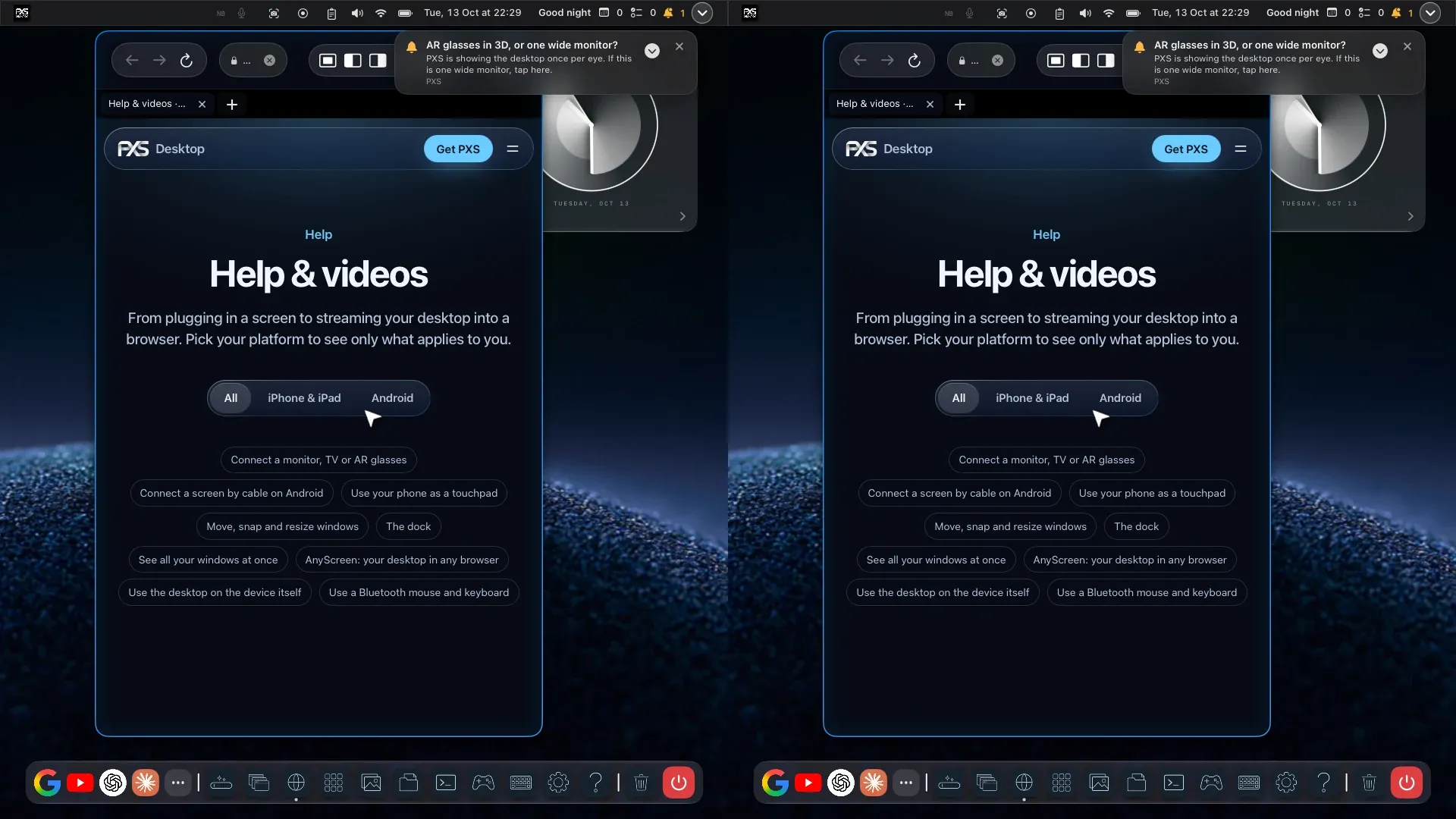 What PXS sends in 3D mode: the desktop once for each eye. This capture is from a 16:9 test screen, so each half is narrow. Viture glasses in 3D give each eye a full 1920 × 1080 picture.
The settings
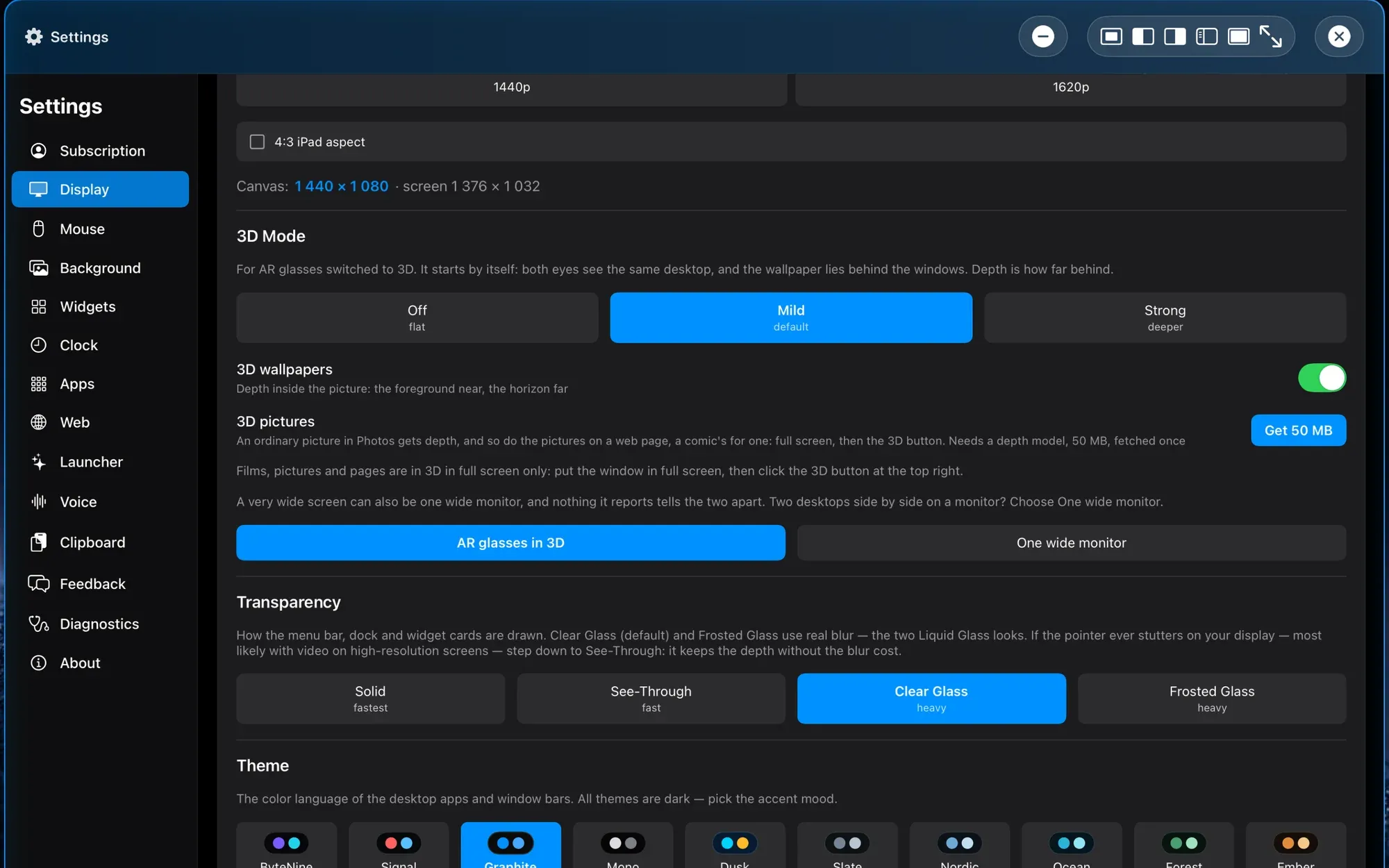
Settings → Display → 3D Mode, in the picture at the top, has four things:
- Depth: Off, Mild or Strong. Mild is the one PXS starts with, and Off keeps the wallpaper flat.
- 3D wallpapers: depth inside the picture.
- 3D pictures: fetches the depth model, 50 MB, once. More about it below.
- AR glasses in 3D or One wide monitor. A very wide monitor looks the same to the phone as glasses in 3D. If you see two desktops side by side on a monitor, choose One wide monitor.
Films in 3D
In 3D mode, a window in full screen has a 3D button at the top right.
- Side-by-side films (SBS) in the browser: play the film, go full screen and click 3D. Each eye gets its own half of the picture. Half-width and full-width films are told apart by the shape of the frame. We have tried it with YouTube and Plex.
- Film files from Files work the same way in the video player.
- Spatial videos, the 3D kind a phone records, open from Files too. Each eye gets the picture the file holds for it.
- On YouTube, PXS has round buttons of its own beside the 3D button: 10 or 5 seconds back, pause or play, and 5 or 10 seconds on. A click on one leaves the film in 3D.
The arrow moves over the film and goes when it rests. For the player’s own controls, click the film or move the arrow to the bottom of it.
Pictures in 3D
- Photos shows spatial photos and side-by-side pictures in 3D: open one, go full screen and click 3D.
- Ordinary pictures get depth too. PXS works out how far away each part of the picture is and draws it once for each eye, with the far parts behind the screen.
- Comics and other web pages: in a browser window in full screen, the same button gives the pictures on the page depth while the page lies still. The text around them stays as it is. Scroll, type or click and you see the page as it is. Leave it alone and the depth is back in a moment.
The last two need the depth model: 50 MB, fetched once in Settings → Display → 3D Mode. It is Apple’s Core ML build of Depth Anything V2 Small. It runs on your phone, and no picture leaves it.
Good to know
- Films, pictures and pages are in 3D in full screen only: put the window in full screen, then click the 3D button at the top right.
- The depth of an ordinary picture is worked out from one view, so it is an estimate. Small flaws can show at the edges of a picture and along the outline of a figure.
- Screenshots and recordings made in 3D mode are one eye’s desktop, a normal picture.
- Films stacked top and bottom are not supported, only side by side.
- We built and tested 3D mode with Viture glasses. Other glasses that switch to one wide side-by-side picture should work the same way. Tell us on the feedback board how it goes with yours.
- 3D mode arrives with PXS 1.2, for iPhone and iPad, together with Screen Sharing.